For years, 10-gigabit Ethernet (10GbE) was considered a luxury only for enterprise data centers and large studios with massive IT budgets. Today, that is no longer true. Thanks to the explosion of second-hand enterprise hardware, affordable SFP+ equipment, and powerful home servers, building a true high-speed 10GbE network at home is now realistic even on a modest budget.
Whether you are running a NAS for media editing, a Proxmox or ESXi virtualization cluster, a self-hosted cloud, or just want blazing-fast file transfers between systems, 10GbE can completely transform your home lab experience.
In this in-depth guide, we will cover everything you need to know about affordable 10GbE for home labs — from choosing the right network interface cards (NICs) and SFP+ modules to selecting budget-friendly switches, designing your network topology, and tuning your system for real-world maximum performance.
Why 10GbE Is Becoming Essential for Modern Home Labs
The traditional 1GbE network has served homes well for nearly two decades. It is reliable, cheap, and easy to deploy. However, modern workloads have outgrown it in many scenarios:
- Large NAS systems with multiple users
- 4K and 8K video editing over the network
- Virtual machine migration and backups
- AI workloads and large dataset transfers
- High-resolution photo archives
- Multi-gig internet connections from ISPs
At best, a 1GbE network provides around 110–120 MB/s of real-world throughput. A well-tuned 10GbE network, by contrast, can sustain 900–1100 MB/s under ideal conditions. That is nearly a 10× improvement in file transfer performance.
More importantly, 10GbE dramatically reduces bottlenecks between fast NVMe storage and the network, allowing your servers and workstations to operate at their full potential.
Until recently, this level of performance required thousands of dollars in enterprise networking gear. Today, thanks to surplus data center hardware and a mature SFP+ ecosystem, you can build a functional 10GbE backbone for a few hundred dollars.
Understanding 10GbE in a Home Environment
Before diving into hardware recommendations, it is important to understand what 10GbE actually delivers in realistic home conditions.
Theoretical vs Real-World Speed
- 10 Gbps = 1.25 GB/s theoretical throughput.
- After protocol overhead, most users see 900–1100 MB/s in sustained transfers.
- Storage performance often becomes the limiting factor long before the network.
If your NAS uses SATA SSDs in RAID or ZFS, you may saturate 10GbE only during sequential workloads. With NVMe pools, 10GbE becomes much easier to saturate.
Latency vs Bandwidth
10GbE not only increases bandwidth but also reduces network latency in many cases, especially when using SFP+ and DAC cables instead of traditional copper RJ45. This matters greatly for virtualization, iSCSI, and database workloads.
10GbE vs 2.5GbE and 5GbE
Multi-gig Ethernet (2.5G and 5G) is gaining popularity and is still a solid upgrade from 1GbE. However:
- 2.5GbE ≈ 280 MB/s
- 5GbE ≈ 550 MB/s
- 10GbE ≈ 1000 MB/s
For virtualization clusters, professional media workflows, and high-end NAS systems, 10GbE is the true “endgame” for copper and short-range optical networking in home labs.
Choosing the Right 10GbE Network Interface Card (NIC)
The NIC is the foundation of your 10GbE setup. Fortunately, the used enterprise market offers excellent value.
The Best Affordable Used 10GbE NICs
These models are widely available on eBay, Amazon Renewed, and IT recyclers at very reasonable prices.
Intel X520-DA1 / X520-DA2
- Interface: SFP+
- One or two ports
- Excellent Linux, Windows, and ESXi support
- Very low latency
- Typical used price: $40–$80
- Ideal for most home lab use
Intel X540-T1 / X540-T2
- Interface: RJ45 (10GBase-T)
- Works with Cat6A copper cabling
- Higher power consumption and heat
- Typical used price: $70–$120
- Good for users who want to avoid SFP+
Mellanox ConnectX-3 and ConnectX-4
- Interface: SFP+
- Extremely low latency and high performance
- Widely supported by Linux and hypervisors
- Typical used price: $50–$130
- Popular in Proxmox and Kubernetes clusters
Broadcom 57810S
- Interface: SFP+
- Dual-port
- Solid performance with good driver support
- Often bundled with retired enterprise servers
New Low-Power Consumer 10GbE NICs
If you prefer brand-new hardware with lower power draw and warranty, consumer-grade options are also available:
- Marvell AQtion 10GbE adapters
- QNAP and Synology OEM 10GbE cards
These typically cost more ($120–$250) but run cooler and quieter than enterprise cards.
NIC Compatibility Considerations
Before buying, always check:
- OS compatibility (Windows, Linux, ESXi, Proxmox)
- PCIe version and lane requirements
- SFP+ module and DAC compatibility
- Support for features like SR-IOV and checksum offloading
Avoid unbranded “clone” cards that use questionable firmware and offer poor driver support.
SFP+, DAC, and Optical Modules Explained
One of the most confusing areas for newcomers to 10GbE is cabling. Understanding the differences between SFP+, DAC, and fiber will help you save money and avoid compatibility nightmares.
SFP+ vs RJ45 (10GBase-T)
RJ45 feels familiar because it uses standard Ethernet cables, but it has several disadvantages:
- Higher power consumption
- More heat
- Higher latency
- Limited cable length at full 10Gb speed without Cat6A
SFP+, by contrast, is more efficient and flexible. It supports:
- DAC cables
- Direct fiber modules
- Passive and active optical links
For most home labs, SFP+ is the superior option.
DAC (Direct Attach Copper) Cables
DAC cables are pre-terminated twinax copper cables with SFP+ connectors on each end.
Advantages:
- Very low latency
- Extremely reliable
- No configuration required
- Usually the cheapest option for short distances
Limitations:
- Maximum practical length: 3–5 meters
- Not suitable for long room-to-room runs
DAC is perfect for:
- NAS to switch connections in a rack
- Switch-to-switch links inside a server cabinet
- Direct workstation-to-server connections
Typical price: $10–$25 per cable.
SFP+ Optical Modules and Fiber
If you need longer distances or room-to-room links, fiber becomes useful.
- SR modules: short-range, multi-mode fiber
- LR modules: long-range, single-mode fiber
For most homes:
- Multi-mode fiber + SR modules is more than sufficient
- LC connectors are the most common
Fiber benefits:
- Electrical isolation
- Future-proofing
- Very long distances without signal degradation
Downsides:
- Higher cost
- More fragile than copper
- Compatibility locks on some switches
Avoiding SFP+ Compatibility Issues
Some switch vendors lock their SFP+ ports to branded modules. To avoid problems:
- Use passive DAC whenever possible
- Buy multi-vendor compatible modules
- Check community forums for confirmed working parts
Affordable 10GbE Switch Recommendations
The switch is the heart of any multi-device 10GbE network. Fortunately, there are excellent budget options for home labs.
Entry-Level Budget 10GbE Switches (Under $300)
MikroTik CRS305-1G-4S+
- 4× SFP+ ports
- 1× 1GbE management port
- Fanless
- Very low power draw
- Layer 2 with limited Layer 3
- Perfect for small 10GbE setups
MikroTik CRS309-1G-8S+
- 8× SFP+ ports
- Fanless
- Silent operation
- Advanced switching features
- Ideal for growing home labs
TP-Link TL-SX3008F (Used)
- 8× SFP+ ports
- Managed
- Enterprise-grade hardware at consumer prices on the used market
Mid-Range Home Lab Switches ($400–$800)
Ubiquiti USW-Aggregation
- 8× SFP+ ports
- Excellent web UI
- Silent
- Integrates with UniFi ecosystem
QNAP QSW Series
- Multiple SFP+ models
- Fanless options
- Good power efficiency
- Simple web management
These are ideal for users who want quiet operation and easy management.
High-End Home Lab and Prosumer Switches ($1000+)
- MikroTik CRS317
- Ubiquiti Enterprise XG series
- Used enterprise aggregation switches from Dell, Arista, or Cisco
These deliver massive port density but come with higher power draw and potentially noisy fans.
Designing a 10GbE Home Network Topology
Your topology should match your real-world use case.
Direct NAS-to-Workstation Link
The simplest 10GbE design:
- One 10GbE NIC in your NAS
- One 10GbE NIC in your workstation
- A single DAC cable or fiber link between them
This delivers maximum speed at minimal cost and complexity.
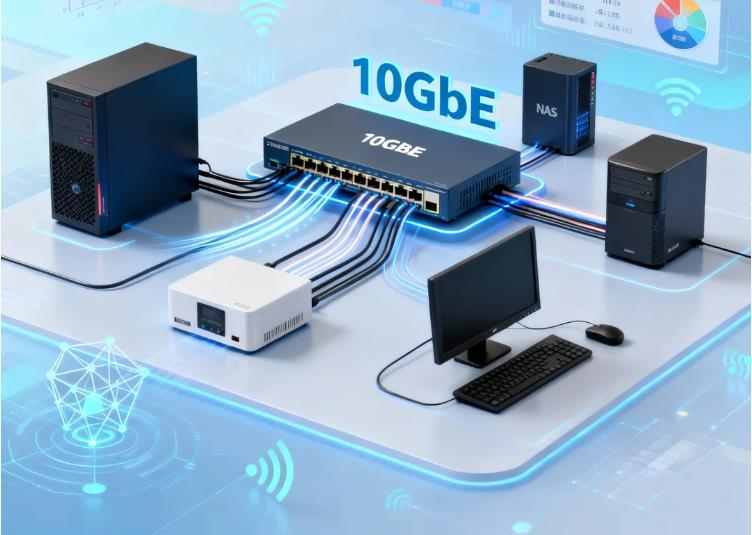
Switched 10GbE Backbone
For multi-device environments:
- 10GbE switch at the core
- NAS, virtualization hosts, and workstations connect via SFP+ or DAC
- 1GbE or 2.5GbE access layer for less demanding devices
This is the most flexible and scalable approach.
Routed 10GbE with VLANs
Advanced users can:
- Segment VM traffic, storage traffic, and user traffic with VLANs
- Use a router with 10GbE uplinks
- Implement traffic shaping and firewall rules at wire speed
High-Speed Network Tuning for Maximum Throughput
Buying 10GbE hardware alone does not guarantee 10GbE performance. Proper tuning is essential.
Jumbo Frames (MTU)
Increasing MTU from 1500 to 9000:
- Reduces CPU overhead
- Improves throughput
- Must be configured on every device in the path
Test carefully, as mismatched MTU settings can cause severe performance issues.
Linux Network Tuning
Key tools:
ethtoolsysctliperf3
Important adjustments:
- Increase ring buffer sizes
- Enable RSS
- Optimize TCP window scaling
- Disable power-saving features on NICs
Windows 10/11 and Server Tuning
- Enable RSS
- Enable TCP offload features
- Disable energy-efficient Ethernet
- Update drivers directly from the chipset vendor
Hypervisors: Proxmox, ESXi, and KVM
- Match MTU on bridges and physical NICs
- Use PCI passthrough for storage traffic if possible
- Prefer VirtIO for guest interfaces
- Keep interrupt balancing enabled
Storage Performance vs Network Performance
A common mistake is expecting 10GbE performance from slow storage.
SATA SSD RAID vs NVMe
- SATA RAID can often deliver 600–900 MB/s
- NVMe pools can exceed 3–5 GB/s
- ZFS configuration greatly affects achievable throughput
For consistent 10GbE saturation:
- Use NVMe cache or all-flash pools
- Use mirrored vdevs instead of RAIDZ for heavy synchronous workloads
Protocol Choice: SMB vs NFS vs iSCSI
- SMB3 multi-channel improves Windows performance
- NFS v4 performs well on Linux
- iSCSI delivers excellent block-level performance but requires careful tuning
Real-World Benchmarking and Testing
Do not rely on synthetic numbers alone. Combine multiple tools:
iperf3for raw network throughput- Large file transfers for storage testing
- Simultaneous multi-stream transfers to test real workloads
A properly built 10GbE home lab should consistently deliver:
- 8–9 Gbps raw network performance
- 700–1100 MB/s sustained file transfer speeds depending on storage
Common 10GbE Problems and How to Fix Them
Only Getting 3–4 Gbps on a 10GbE Link
Common causes:
- MTU mismatch
- Poor quality SFP+ modules
- PCIe slot bandwidth limitation
- CPU bottlenecks
Overheating NICs
Most enterprise 10GbE NICs rely on strong airflow. In desktop cases:
- Add a dedicated fan near the NIC
- Use low-profile heatsinks
- Avoid stacking hot components
DAC Not Linking Up
- Firmware incompatibility
- Vendor-locked ports
- Passive vs active mismatch
Switch Noise and Power Draw
Some used enterprise switches are extremely loud. Always check:
- Fan specifications
- Idle power consumption
- Community noise measurements
Cost Breakdown: Building a 10GbE Home Lab on a Budget
Ultra-Budget Point-to-Point Setup (~$150–$200)
- 2× used Intel X520 NICs
- 1× DAC cable
- Direct workstation-to-NAS connection
Standard 10GbE Core Network (~$400–$600)
- MikroTik CRS305 or CRS309
- 2–4 SFP+ DAC cables
- Used enterprise NICs for servers and workstations
High-Performance Home Lab Backbone ($1000+)
- 8-port or 16-port 10GbE switch
- NVMe storage pools
- Multiple hosts with dual-port 10GbE NICs
- VLAN segmentation
Is 10GbE Worth It for You?
10GbE delivers tremendous benefits when:
- You routinely move large files
- You virtualize multiple workloads
- You rely on network-attached storage for production work
- You want enterprise-level performance at home
If your usage is limited to basic web browsing, streaming, and light file transfers, 2.5GbE may offer a better price-to-performance ratio.
Final Recommendations and Best Practices
- Favor SFP+ over RJ45 whenever possible
- Use DAC cables for short-range links
- Buy well-documented used enterprise NICs
- Prioritize silent, fanless switches for home environments
- Always tune your OS and storage stack
- Benchmark every stage of the network
With the right planning and component choices, it is now realistic to build a silent, power-efficient, and extremely fast 10GbE home lab network that rivals small professional environments — without spending enterprise-class money.
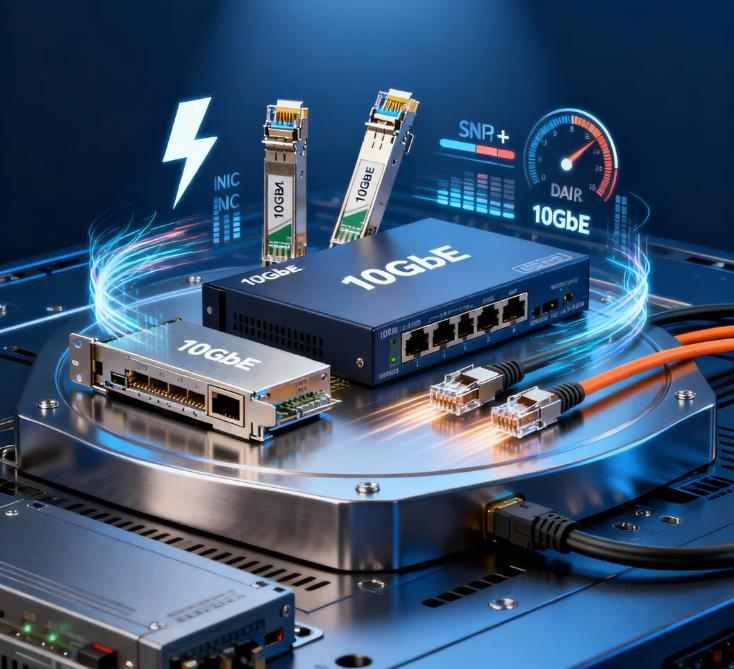
Affordable 10GbE is no longer a niche luxury for data centers only. It has become a practical upgrade path for home labs, advanced NAS setups, and prosumer workstations. The combination of cheap used NICs, flexible SFP+ connectivity, low-cost DAC cables, and quiet fanless switches has brought true high-speed networking into reach of everyday enthusiasts.
By carefully selecting hardware, designing an appropriate topology, and applying proper high-speed tuning, you can unlock the full potential of your storage, virtualization, and media workflows. A well-built 10GbE network is not just faster — it fundamentally changes how your entire home infrastructure performs.